



Introduction
Science, technology, engineering, and mathematics (STEM) teaching starts with questions. When you design an investigation that sparks genuine curiosity, adjust a lab on the fly as students dig deeper, or find just the right phenomenon to make a concept click, you’re doing the work that defines excellent STEM instruction. The habits of mind that students develop through inquiry — questioning assumptions, testing ideas, revising their thinking — are exactly what they’ll need beyond your classroom.
At the heart of that process is inquiry. STEM learning environments are student-centered, iterative, and driven by curiosity. The real learning happens when students reevaluate a failed hypothesis, when data surprises them, and when they move beyond simply following steps and start asking why. In STEM, the inquiry process isn’t a means to an end. It is the learning.
There’s something fitting about asking how AI fits into this in a STEM context. Technology is right there in the name. STEM teachers already ask students to think critically about what technology can and can't do. AI tools can assist with generating questions, organizing information, and drafting explanations — the same areas in which students need to build their own skills. That makes this a genuinely new moment for STEM education.
At Common Sense Media, we believe decisions about technology integration are most effective when they start with your learning goals. Identify your learning objectives first, then select technology that supports and even amplifies those intended outcomes. Technology is not a second thought, but an active and meaningful choice. Before diving into what Apple Intelligence can do, consider: What do you value most in your STEM teaching? What do you want your students to know, understand, and do by the end of this investigation? How do you envision AI supporting, not replacing, the curiosity, investigation, and student-centered learning in your classroom? Keep those answers close as you read what follows.
If you’ve read our previous guides — Teachers’ Essential Guide to AI Fundamentals with Apple and Teachers’ Essential Guide to Creativity with Apple Intelligence — you’ve explored how to evaluate AI tools through your educational values. This guide builds on that foundation. Using the 5E Model as our organizing framework, we’ll explore how Apple Intelligence can amplify each stage of the inquiry process in STEM while you remain the expert in the room. Apple Intelligence features are integrated across apps and experiences to help users communicate, express themselves, and get things done. Feature availability can vary by platform, language, and region. Learn more.
STEM Thinking and the Classroom: The 5E Model
This guide uses a framework you may already know — the 5E Model — to help you explore how Apple Intelligence can support and amplify STEM teaching in your classroom. Developed in the late 1980s, the model organizes inquiry-based learning into five stages: Engage, Explore, Explain, Elaborate, and Evaluate. It maps naturally onto the kind of iterative, student-centered teaching that defines great STEM instruction.
Each section walks through one stage of the 5E Model. You’ll see the work students are doing, the role of the educator, and where Apple Intelligence can support the process. At every stage, you decide when a tool helps and when it doesn’t.
Image

Engage
The Engage stage is where inquiry begins. Before students can investigate, they need a reason to care. This stage is about sparking curiosity, surfacing prior knowledge, and generating questions that will drive the investigation forward.
Inquiry work: Students encounter a phenomenon, problem, or question that activates prior knowledge and raises new questions. This is the entry point into the inquiry cycle, where interest is ignited before answers are introduced.
Your role: You set the conditions for curiosity. You choose the phenomenon, anticipate where students’ thinking might go, and create space for questions to emerge organically.
How Apple Intelligence and Apple’s AI-enabled features can support this work:
- Use Writing Tools to draft and refine driving questions or problem scenarios that draw students into the inquiry.
- Use Image Playground to generate visuals of phenomena or real-world problems that spark students’ curiosity.
- Use Image Wand in Notes to turn rough doodles, sketches, or blank notes into polished, high-quality images based on surrounding text or a description to deepen inquiry.
Guiding question: Is AI helping you create a more compelling entry point into the inquiry, or is it deciding what students should be curious about?
Explore
The Explore stage is where inquiry comes alive. Students move from curiosity to investigation, getting hands-on with materials, data, and ideas. Students construct their understanding before formal explanations are introduced. The goal is productive struggle and genuine discovery.
Inquiry work: Students conduct investigations, collect data, and begin building their own understanding of the phenomenon. They make observations, identify patterns, and generate new questions as they go.
Your role: You observe and guide without overdirecting. You resist the urge to jump in with answers, giving students space to construct meaning from their experience. You watch for moments when a nudge is needed and when stepping back is the right move.
How Apple Intelligence and Apple’s AI-enabled features can support this work:
- In Notes, use audio recording, transcription, and summaries to help students capture observations in real time without breaking the flow of their investigation.
- Use Math Notes to experiment with equations, graphs, and data while visualizing data as it is collected.
Guiding question: Is AI supporting students in capturing and organizing their thinking, or is it stepping in before students have the chance to wrestle with the data?
Explain
The Explain stage is where students begin to make sense of what they discovered. After the hands-on work of Explore, observations become understanding as you help students find the language to articulate what they found. You introduce the vocabulary, concepts, and explanations that connect student thinking to the broader ideas.
Inquiry work: Students reflect on their investigations, share what they noticed, and begin constructing explanations for the patterns they observed. They connect their firsthand experience to scientific concepts and vocabulary.
Your role: You surface and clarify student thinking, introduce formal vocabulary and disciplinary explanations, and help students bridge the gap between what they experienced and what it means. You are listening as much as you are talking.
How Apple Intelligence and Apple’s AI-enabled features can support this work:
- Use Writing Tools to help students draft and refine explanations of their findings, strengthening clarity without replacing their thinking.
- In Notes, use audio recording, transcription, and summaries to help students express their understanding when writing is not a key learning objective.
- Use translation features, including Translate, Live Translation, and the Translate app, to help multilingual learners access science content.
Guiding question: Is AI helping students communicate their thinking more clearly, or is it producing explanations that students haven’t actually arrived at themselves?
Elaborate
The Elaborate stage is where understanding gets tested and deepened. Students take what they have learned and apply it to new contexts, more complex problems, or different phenomena. This is where surface-level understanding gives way to something more durable. It is also where students begin to see the broader reach of the concepts they have been building and where genuine transfer of learning starts to happen.
Inquiry work: Students apply their understanding to new situations, extend their thinking into more complex territory, and make connections across ideas. They’re moving from recall to application.
Your role: You introduce new challenges that push their thinking further, connect the current investigation to broader concepts or real-world applications, and ask the questions that keep students from settling too quickly into comfortable conclusions.
How Apple Intelligence and Apple’s AI-enabled features can support this work:
- Use Image Wand in Notes to sketch and visualize design ideas or conceptual models as students push their thinking further.
- Use Image Playground to create visual representations of phenomena or key vocabulary to deepen students’ understanding.
Guiding question: Is AI helping students extend and apply their own thinking, or is it generating the connections and applications that students should be making themselves?
Evaluate
The Evaluate stage is where students and teachers take stock of how much learning has taken place. In an inquiry-based learning environment, evaluation isn’t just a final step — it is woven throughout the entire process, surfacing what students understand, where their thinking still needs work, and what comes next.
Inquiry work: Students reflect on their learning, demonstrate their understanding, and identify where their thinking has grown and where questions remain. Evaluation in inquiry-based learning looks less like a final test and more like a culminating opportunity to show and articulate genuine understanding.
Your role: You assess where students are, use what you find to inform your next steps, and create opportunities for students to reflect on their own growth as learners and thinkers. You are looking at what they know and how they are developing as inquirers.
How Apple Intelligence and Apple’s AI-enabled features can support this work:
- Use Math Notes to analyze data from student work, identify patterns in performance, and visualize where the class as a whole is in their understanding.
- Build your own shortcut that supports an “exit ticket” activity aligned to your lesson objectives and sends outputs directly to Notes to document the learning process.
Guiding question: Is AI helping you and your students get a clearer picture of where learning stands, or is it flattening the nuance and complexity of what students actually understand?
Inquiry Integrity Check
In our previous guides, we explored the difference between AI that replaces your thinking and AI that amplifies your capabilities: the loom and the crane. In STEM learning, you’re using your professional judgment not just to determine whether a tool is enhancing or replacing student thinking, but to determine the impact on the quality of your students’ inquiry.
Inquiry-based learning is built on a productive tension. Students aren’t supposed to know the answer yet. They’re meant to wrestle with data that doesn’t immediately make sense, ask questions that don’t have obvious answers, and construct understanding from evidence. This tension is where meaningful learning happens.
AI tools used without intention can quietly dissolve that tension. As an educator, you’re best positioned to notice when that is happening and to make decisions about when AI supports the process or gets in the way.
Consider this simple set of questions you can ask to evaluate whether AI is serving the inquiry or compromising it:
Are students still leading the inquiry?
The driving questions and curiosities that fuel an investigation should come from students, not from tech or AI.
Is the productive struggle intact?
Not all struggles in a classroom are the same. Productive struggle happens when
students are challenged just beyond what they already know. If tech or AI is used to
smooth over moments of uncertainty and confusion that naturally arise, it removes
the conditions that make inquiry meaningful.
Who owns the understanding?
Can students explain what they found, why it matters, and how they know? If the
answer is no, it’s important to examine where in the process the thinking was handed off.
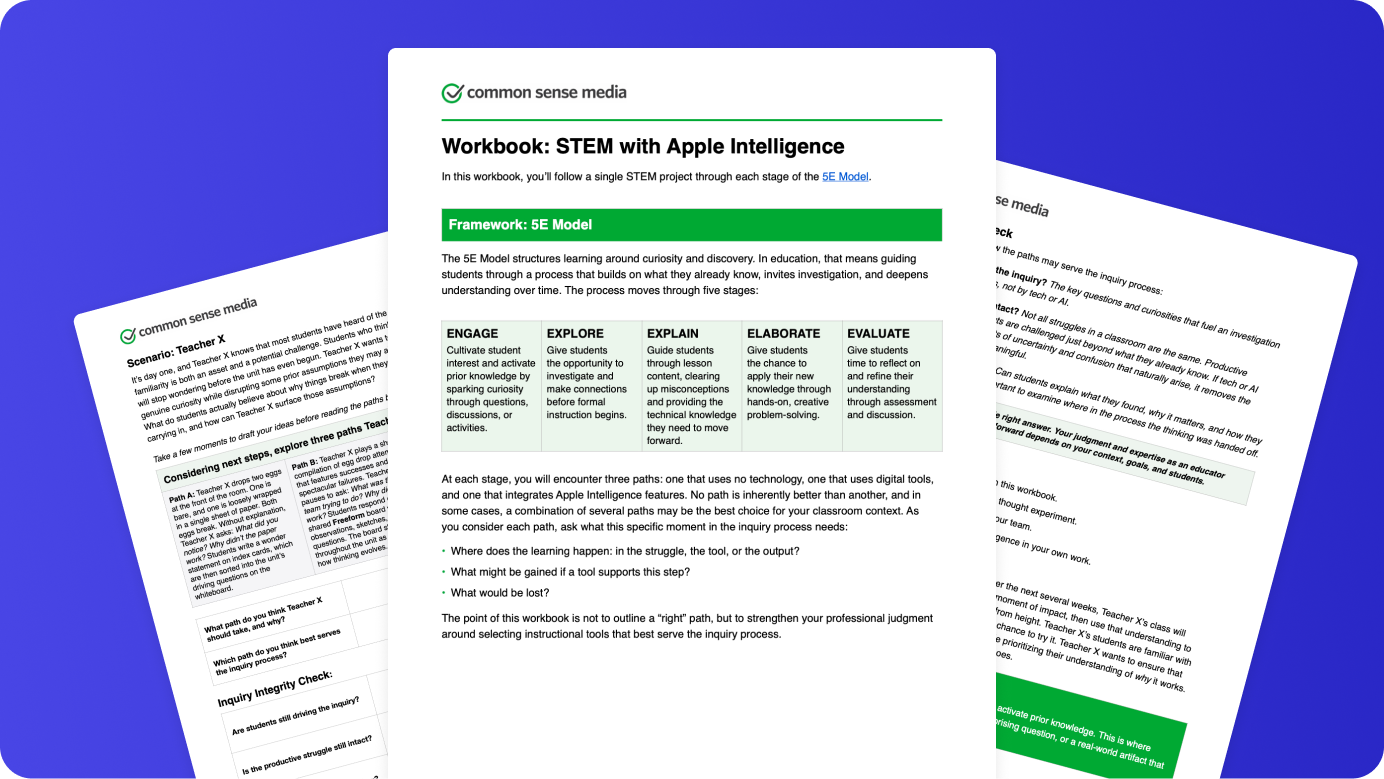
These questions are not meant to be answered once and set aside. The integrity of inquiry is worth revisiting at every stage of the 5E Model. We’ve designed the companion workbook to support exactly that. As you work through a real-world example across the stages of the 5E Model, you’ll explore paths that range from almost no use of technology to the use of Apple Intelligence tools, all providing unique options for student engagement and meaningful learning. You’ll have the opportunity to apply the Inquiry Integrity Check at each stage, reflecting on how the different paths may support the inquiry process.
Using the workbook
You can engage with this workbook on your own as a thought experiment, bring it to your team and discuss the trade-offs together, or return later after trying Apple Intelligence in your own work.
Companion Workbook: STEM with Apple Intelligence
Moving Forward
As you continue to design learning experiences for your students, keep these key considerations in mind to ensure technology deepens the inquiry process rather than replacing it:
- Does this tool create more space for students to wonder, investigate, and make meaning, or does it move them past these moments?
- Who is this choice designed for, and who might it leave behind?
- Am I staying in the designer’s seat, or letting the tool design for me?
You don’t need to use AI when teaching STEM — many educators create powerful inquiry learning experiences without it. If you choose to experiment with Apple Intelligence features, let your values remain your North Star. AI tools have the potential to enhance learning and teaching experiences when guided by your expertise.
Learn More
To learn more about Apple in Education, visit Apple’s Community Education Initiative.
For more teacher resources and support, visit the Apple Education Community.
Learn more about Common Sense Media AI PD self-paced courses for educators.
Learn more about Common Sense Media’s Digital Literacy & Well-Being Curriculum.